Deliver each finding to a service you run, as a signed JSON request that carries its evidence. About five minutes on the screen, plus the work on your service.
Before you start
You need:
- an address on a service you run that starts with
https://and accepts a POST request; - a place in that service's configuration to store a secret;
- a receiver at that address that answers with a status from 200 to 299. The two sections at the foot of this page give what arrives and what your service must do with it.
Open the screen
On Destinations, select Add a destination under the topic.
Select the Webhook tile, marked HTTP endpoint.
Enter the address
Under Webhook URL, type the address of your service. Save destination stays inactive until the address starts with
https://.Select Save destination.
Save the secret
A dialog titled Webhook signing secret opens over the page. Select Copy.
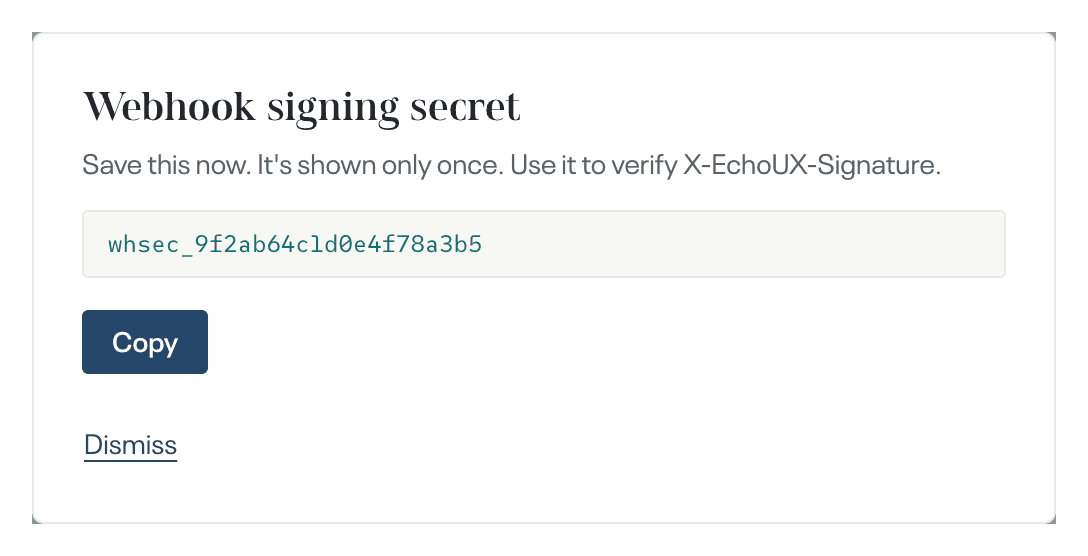
Store the secret in the configuration of your service. It is shown once, and it is the key your service uses to verify each request.
Select Dismiss.
Check it arrives
Under Destination saved, select Test delivery. The test is a sample finding titled "Sample artefact, safe to delete". Delivered appears beside the button when your service answered with a status from 200 to 299. Failed or No response within 30 s appears when it did not: correct your service, then select Retry test delivery.
Select Done. When you sign in for the first time, the button is Continue.
Connecting a webhook is complete when
- your service received the test request and Delivered is shown beside the button;
- on Destinations, the topic lists Webhook with the address of your service.
What happens next
For a new topic, deliveries begin when its first cycle produces a finding, usually between several weeks and two months after collection starts. A destination added to a topic that already has findings receives the findings of the latest completed cycle, once. Each finding then arrives as one request. There is nothing to do while you wait.
What arrives
- One POST request per finding, with
Content-Type: application/json. The body is the JSON record. - The body's top-level fields are
event,payload_version,tenant_id,topic_domain_id,timestamp,artefact,facets,evidence,evidence_summaryandgrounding. Two more appear when they apply.change_topic_urlis the address that opens the topic's wording.theme_recurrencegives the theme and the number of cycles it has been seen in.artefactholds the finding's sections; each entry inevidenceholds one quote with its section, voice, source and date;groundingholds what the evidence supports and what it does not;facetsholds each score with its reason. eventisartefact.stampedfor a finding andtest.samplefor a test delivery, and a destination added on this screen receives no other event.payload_versionis2, and new fields can appear within a version.- Every request has four echoUX headers:
X-EchoUX-Signature,X-EchoUX-Timestamp(Unix seconds when the request was sent),X-EchoUX-Event(the same value asevent) andX-EchoUX-Delivery-Id(one id per delivery). - The test request is signed in the same way as every real delivery, so your verification code can be checked against it.
- No quote carries an author identifier: no name, email, handle or user id.
What your service must do
- Verify
X-EchoUX-Signature. It issha256=followed by the lower-case hexadecimal HMAC-SHA256 of the raw request body. The key is the secret exactly as the dialog showed it, including itswhsec_start, as UTF-8 text: nothing is decoded first. - Compute that value over the exact bytes you received, before parsing them. Compare the two with a constant-time comparison, one whose duration does not depend on where the values differ.
X-EchoUX-Timestampis not part of the signature. - Read fields by name, and ignore any field you do not know.
- Answer within 30 seconds. A test delivery waits the same 30 seconds as a real one. A delivery is successful only when the answer is a status from 200 to 299.
- Give the address your service answers on directly. A redirect is not followed, so a status from 300 to 399 is a failed delivery.
- Expect a delivery to be sent again when it receives no answer, or any status other than 200 to 299. The exception is a status from 400 to 499 other than 429, which stops that delivery immediately. The later attempts follow 1 minute, 5 minutes, 30 minutes, 2 hours and 8 hours after the attempt before them: six attempts in all. A test delivery is sent once and is not repeated.
- Use the ids to detect a repeat. Every attempt of one delivery has the same
X-EchoUX-Delivery-Id, so use that id to detect a repeated attempt. A finding that is delivered again arrives under a newX-EchoUX-Delivery-Idand keeps the sameartefact.id, so useartefact.idto detect a repeated finding.