Which state your account is in, what stops while it lasts, and the way out of each one.
What you are looking at
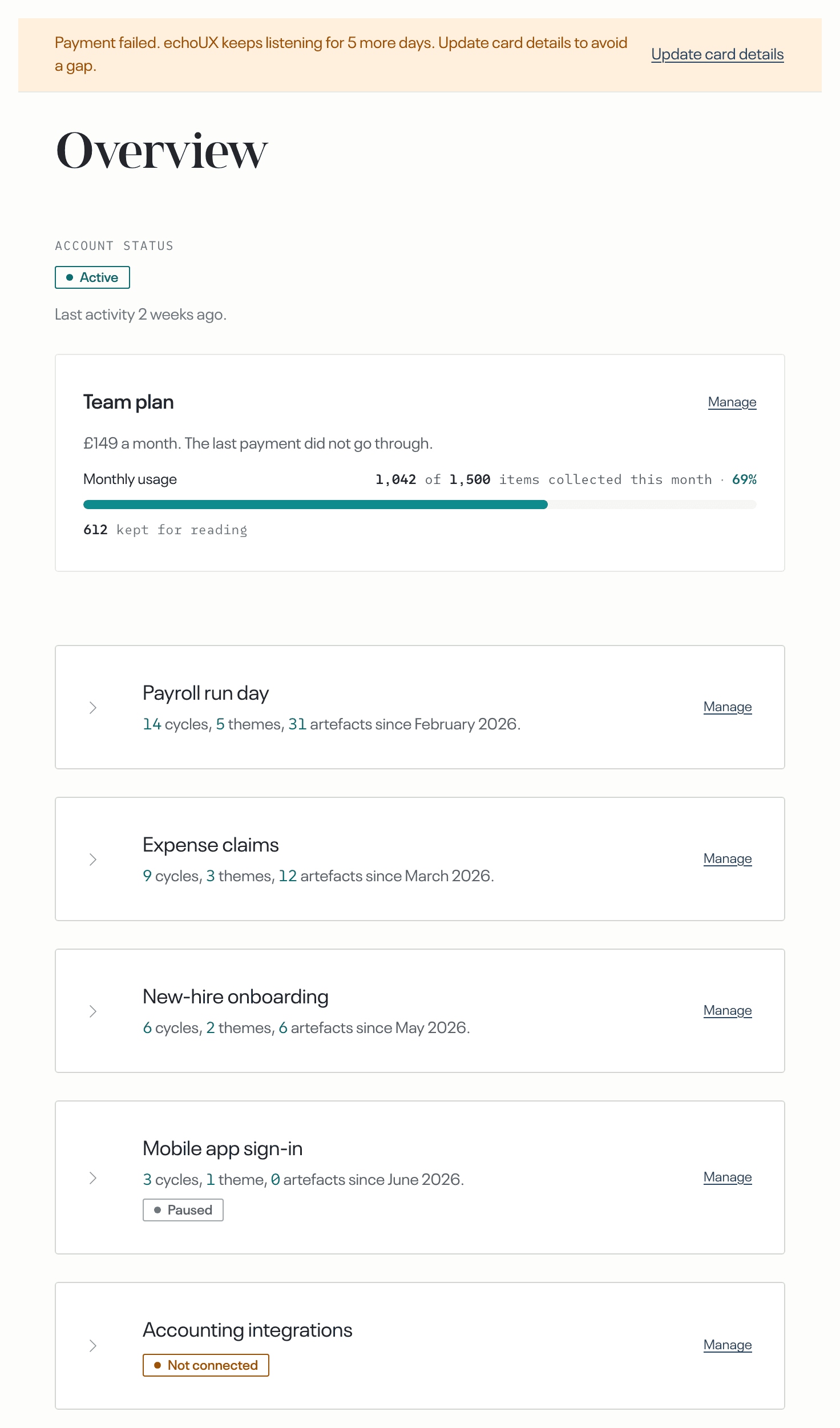
Two places show the state. On the Overview, under Account status, one badge names the whole account: Active, Setup incomplete, Paused, Closed or Needs attention. Above every page in the account, a bar states each fact that is true at that moment, one line for each.
The two answer different questions, so they do not always match. A line can stand in the bar while the badge still reads Active. The line is the one to read: it names the situation, and it carries a button when you are able to act on it.
Setup incomplete means no topic has a source yet: see Set up echoUX.
A payment failed and the account is still running
Nothing stops while this line stands, unless the month's allowance is also used up. Feedback is still collected, cycles still happen, and findings are still delivered.
The badge stays Active.
A person who cannot update the card reads that line with a different ending: it says that collecting stops until the card is updated. That is what will happen when the days run out, not what has happened.
When the month's allowance is also used up, collecting stops and the badge reads Needs attention. Updating the card alone does not restart it: the allowance is spent as well, so add feedback volume or wait for the reset.
Only an admin can update the card, because only an admin reaches the payment details. If you are not one, ask an admin on your account to do it.
Select Update card details in the bar. It opens Billing, in the Account area.
On Billing, select Update card details again. Your card and your invoices are kept by Stripe, so this opens Stripe.
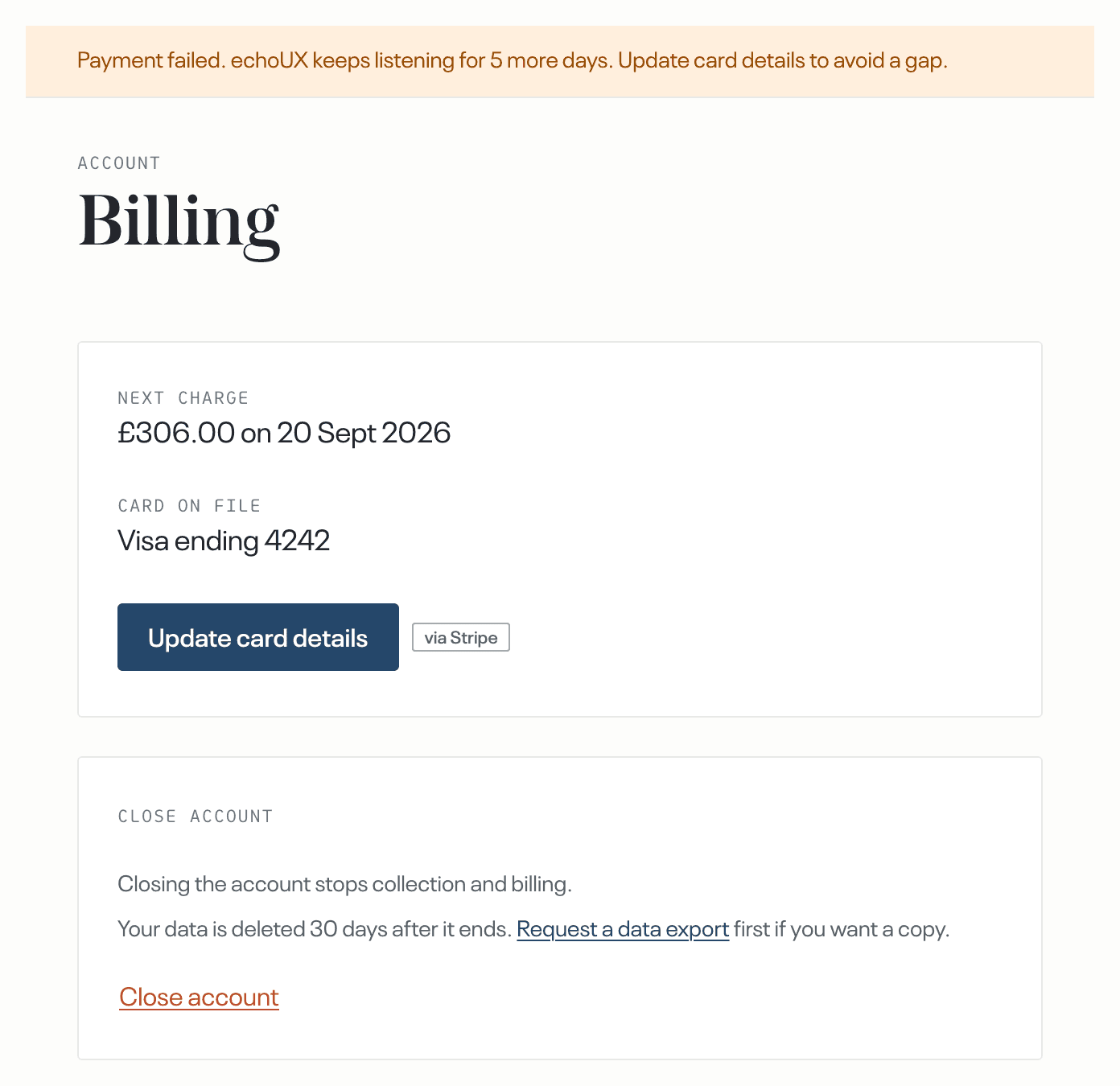
In Stripe, pay the open invoice or replace the card.
Paused
The badge reads Paused in two situations, and the bar's line names which one you are in. In both, everything stops: no source is checked, no feedback is collected, no cycles happen, and nothing new is delivered. Findings that were already delivered stay where they were delivered.
The days after a failed payment ran out
The way out is the three steps above.
A trial ended
Open Billing, in the Account area. Where the page says there is no plan on this account, select Get in touch.
Closed
The badge reads Closed when the account has been closed. Everything stops, as it does when the account is paused, and the data is deleted on a fixed date. The line carries Export your data, and Reactivate for an admin. Updating the card does not reopen a closed account. What to export, what is kept and how to reopen the account are in Close your account, or reactivate it, article 27.
Needs attention
The badge reads Needs attention for five reasons: a login has expired, delivery to a destination did not succeed recently, a cycle failed, the month's allowance is used up, or cycles are paused on echoUX's side. A spent allowance is stated under the usage bar. The other four are lines in the bar at the top. Only the affected part stops. A topic whose source cannot be reached collects nothing, and a destination that cannot be reached receives nothing. Every other topic, source and destination continues.
When the badge stands with no line in the bar, open Sources and Destinations: the row states the fault in place.
Anyone on the account can do the repair. Select the row to open its options. Where a login expired, select Reconnect and sign in to the tool again. Where deliveries to a destination keep failing, the row offers Test delivery instead, and a delivered test brings that destination back. Both repairs are in A tool disconnected or a login expired, article 29.
One more line can put the badge on Needs attention: Cycles on this account are paused. Get in touch to have them restored. It names no cause because the cause is on echoUX's side, not yours: nothing you connected has failed, and no allowance is spent. Select Get in touch; the pause is lifted on our side.
The fix has worked when
- the line is gone from the bar the next time you open a page;
- on the Overview, Account status reads Active;
- on Sources or Destinations, the repaired row no longer reads Login expired or Delivery failing.
What happens next
The account returns to Active as soon as the payment is confirmed. The badge and the bar show the new state the next time you open a page.
Collecting starts again at each source's next scheduled check. A source that is checked on a schedule is read forward from the point it stopped, so feedback that arrived while the account was paused is still collected. Feedback that arrives by an API token instead is refused while the account is paused, and the tool that sent it does not send it again.
A cycle runs on a topic once about twenty pieces of feedback are waiting on it, so the first findings after a pause depend on how much feedback arrives.